Showing posts with label digital resources. Show all posts

Sunday, 3 December 2017

The public library as a place for the sharing of culture

This case study of Newcastle Libraries was written by myself in December 2016 for inclusion in Fred Saunderson's and Gill Hamilton's book Open licensing for cultural heritage  published August 2017. This is one of two contributions published under a Creative Commons Attribution licence (the other being Merete Sanderhoff's "Small steps, big impact: how SMK became SMK Open").


Newcastle Libraries are the public libraries serving the citizens of the City of Newcastle upon Tyne, UK. Newcastle is the biggest city in the North East of England and its library service, in particular the City Library, attracts users from across the region and beyond. The City Library houses the local studies and family history collections - this section also regularly receives requests and enquiries from overseas customers.

In the early 2000s a funded project allowed Newcastle Libraries to digitise a large part of its local history photographic collections and to publish them on a dedicated website called Tyneside Life and Times. However, a few years later the website encountered technical difficulties and the photographs were moved to the Flickr image hosting platform in June 2009. When the Flickr albums were created the images’ legal status appeared as the default copyright setting. Download was originally disabled but this was changed early on, although this particular feature was never publicised. Apart from the Torday collection (a thousand photographs of 1960s-1970s Newcastle) which was digitised by a volunteer and uploaded to a new album, the historic images collection on Flickr has only been extended on an ad hoc basis.

In 2015 I started developing at Newcastle Libraries the Commons are forever project, with support from the Carnegie UK Trust’s Library Lab programme. Commons are forever aimed to empower people and inform them of their rights to use and re-use works that are either in the public domain or available under an open licence, and encourage them to in turn share their creations with others. The project took the form of a series of events where members of the public were invited to create their own artworks in workshops facilitated by local artists, while learning about copyright and where to find free-to-use content.
A secondary goal of the project was to firmly re-position the library service as a place for the sharing of culture. Public libraries are traditionally making knowledge and culture accessible through loaning materials to members of the community, but I believe raising awareness of works that are out of copyright - in the public domain i.e. that belong to all - or under open licenses is also part of libraries’ role. On that basis, it made sense to me to use Commons are forever to also promote resources that are part of Newcastle Libraries’ collections and have entered the public domain. Since we were promoting free-to-use materials as part of the project we also needed to apply those sharing principles to our collections and our services.

The first step would be to correctly re-label the local history images on Flickr from “copyright - all rights reserved” to “public domain”. In order to get this agreed and done I started talking to colleagues in June 2015. It emerged that the issue was less about owning copyright over the digitised pictures and more about enforcing an indication of provenance: people who were not using our pictures for commercial ventures should be able to use them for free but be obliged to mention they were from our collections. However, it was felt that claiming copyright was still important because we were the keepers of the collection: if people want to make money from using our pictures then the library should get something too, and it should be clear that the images came from Newcastle Libraries. As we were selling copies of our pictures, the potential loss of income was mentioned - at a time of budget reductions even the small amount we were making may become significant.

Swing Bridge, Newcastle upon Tyne, 1889
From the Newcastle City Library Photographic Collection

After this initial meeting the conversation stalled as changing this particular policy which had been in place for a while was not part of the team’s priorities. The topic was picked up on several occasions over the following year and the number of people involved in the discussions was extended to the wider group of librarians. To get colleagues to understand why I wanted the Flickr images’ status changed from in copyright to public domain I used arguments such as: “because you’re trying to claim rights that you probably don’t have, what we are doing now is slightly illegal but also ethically wrong”!

Towards the end of the Commons are forever project the focus moved from sharing creative works to sharing data and information collected by the library service. We released performance statistics and usage figures as open data - using the UK Open Government Licence (OGL) which allows anyone to re-use the information in any way, as long as the source of the information is credited. In April 2016 we ran a one-day hackathon when we invited members of the community to “play” with our open data. For the occasion we were also given permission to publish 31 digitised historical maps of Newcastle from the libraries’ collections - in the public domain, clearly labelled as such in a Flickr album. The maps proved quite popular, with several participants using them to superimpose “old Newcastle” to a current map to highlight the evolution of the city centre.

I think what happened with the maps helped to show colleagues what releasing our information and content meant, and more importantly that it did not harm the library service. On the contrary, it was interesting to see what citizens had done with our maps when appropriating them - re-using them in ways we had not thought of and contributing to the visibility and reach of our collections.

Plan de Newcastle ou Neuchastel
From the Newcastle Libraries collection

In August 2016 we changed the status of our local history images on Flickr to “public domain”. Each album now bears the mention:
“These images are, to the best of our knowledge, in the public domain. You are welcome to use them in any way you like – we would love it if you could say you got them from the Newcastle City Library Photographic Collection. If you want to use the images for commercial purposes we can provide you with a high quality digital image for a fee – just contact us.”
On the spur of the moment, it was also decided to move the Torday collection (the copyright of which had been assigned to Newcastle Libraries) into the public domain - under CC0.

We were pleased to see this initiative bear fruits a few months later, with an article in a local newspaper about Newcastle’s old Odeon cinema featuring several of our Flickr images - all in the public domain but nevertheless used with the mention “from the Newcastle City Library Photographic Collection”.

Around the same time we changed the status of of our local history images on Flickr to “public domain”, we also decided to stop using OGL for our open data and use CC0 instead, making it even easier for our information to be re-used.

In December 2016 we went further: we librarians agreed that in the future all Newcastle Libraries collections and documents published online would be made open by default. All public domain materials digitised from our collections will be clearly labelled as such when published. Materials created by library staff - images, event pictures, information booklets, training guides, etc. - will be published under a Creative Commons Attribution license. In 2017 we will start making more of our content available via platforms such as Flickr and GitHub.


Sunday, 8 May 2016

The SCL Learning Offer in the North East

Last Friday 6 May I had the opportunity to attend the Society of Chief Librarians' Universal Offers roadshow at Newcastle City Library.
My understanding is that the Universal Offers have been developed by the SCL to better promote what public libraries do but also help library services understand where they might be lacking or leading compared to others in England. When a public library signs up to an Offer they agree to provide a core package of services linked to a particular area. For example, the Digital Offer includes: "free internet access (for a minimum period of time), clear and accessible online information about library services, staff trained to help customers access digital information". The Offers are continously expanded and new ones are developed.

The regional roadshows allow librarians to come together to share best practice but also provide feedback on each Offer - for a snapshot of the North East event, check out the #neroadshow hashtag on Twitter. I spent my day at the Learning Offer table, as I had been asked to share my experience of releasing and re-using library data and how the Wuthering Hacks hackathon I organised last month encouraged members of the public to "develop and share ideas and learn together" in libraries, which is one of the points in the Learning Offer.

The Learning Offer also covers "that coding and making stuff"; as library staff felt they needed more information about how to run these types of activities, the SCL has produced a toolkit called Code Green to help them.
In Newcastle we have recently invested in some kit, so my colleague @biblioluke and I had set up some (Raspberry Pi, Arduino, etc.) in the room for roadshow attendees who'd never tried these to have a go. I am afraid the first thing I did with attendees arriving to the Learning Offer table in the morning is engage them in a bit of making! They created foil sculptures - which were fantastic and included a bird, a boat, a bracelet, a dog, a caterpillar (or similar type of creature) - to show off how a MakeyMakey works!


The reason for this post is simply that I took a few notes during the day, and instead of forgetting them I thought I might as well write them all up. Below is therefore a quick roundtable of some of the things I heard from colleagues in library services across the North East.

The Learning Offer in the North East: what other libraries are doing
  • Gateshead Libraries, like many others, offer a weekly job club: in 4 to 5 weeks unemployed customers learn how to write their CV using a computer, search for jobs online... Theirs is mainly attended by people over 50 years old. They may not get a job straightaway but they get a huge confidence boost.
  • In Middlesbrough the local history volunteers are realising how valuable their local knowledge is and therefore building their confidence too. They are now presenting to other groups and doing talks, one volunteer even teaching another how to use Powerpoint when they weren't particularly IT-savvy! 
  • In Northumberland the first Code Club is about to start at Hexham Library. When the library service was looking for volunteers, most of them seemed more interested in working with schools... In the end the Council's Digital Team helped get the Code Club set up, so the library is getting benefits from the activity with minimal input. 
  • In North Tyneside the Lifelong Learning arm of the Council deliver courses in libraries and are happy to take suggestions from library staff on further courses to offer.
  • Stockton Libraries took part in the BBC Get Creative Day on 2nd April and invited local creative people to showcase their work and run workshops for customers, including one on pottery and another on book art!

Thoughts on the Learning Offer
  • Local Studies and Family History are actually a big part of most services' learning offer (more than coding!)
  • The Learning Offer gives public libraries a chance to target other groups - those that maybe don't use libraries much / that we don't cater for very well e.g. teenagers, young adults in education.
  • More and more services are being pressured into generating income, but most of our customers can't afford to pay for things including learning activities.
  • Barriers to implementing the Learning Offer: space, time, money, staff. There are also less learning providers and they are offering courses in libraries with now-reduced hours.
  • Some Councils are putting pressure on libraries by asking: "OK, the library is doing this because it fits with its role, but what does it bring to the Council as a whole?"
  • Comment on the hackathon case study: if libraries ask Councils/IT anything to do with systems and data, the first answer they'll get is no.
  • Through SCL we could work more closely together. It's great to be able to meet people at the regional roadshow and know who to ask for advice on particular topics, though more formal peer mentoring or training is needed.
  • Next steps for the Learning Offer: more stuff for adults! Coding is not just for children [I couldn't agree more!]

Sunday, 7 February 2016

Coding: what schools do...

...that libraries could take inspiration from.


Last week I got sent on a training organised by the North-East group of ASCEL, the Association of Senior Children's and Education Librarians. Now, I'm clearly not a children's librarian (my association wouldn't be ASCEL but more something like: ACGIFL, the Association of Copyright Geeks and Intellectual Freedom Librarians! If it existed, of course.) My colleague who was supposed to go had an emergency and basically the head of the Children's team came to me and said: "Aude, it's training about coding, robotics etc. - you're into those things, would you go so the place isn't wasted?"

So there I am the next day, at the Open Zone CLC in South Shields. The Open Zone CLC team help school teachers across South Tyneside with IT. They provide support and training on the technical side of things but also deliver computing lessons for pupils as young as 4 years old and up to 18.
Interestingly, Open Zone also runs some workshops for parents, specifically on e-safety - however, they found there was a very low take-up, as the vast majority of parents don't realise how important safety and privacy online are!

Our trainer started by telling us about the new computing curriculum for Key Stage 1 & 2 (primary school, 5 to 11 year-olds), which encompasses computer science, information technology and digital literacy including e-safety. The day was then spent trialling some of the tools and devices Open Zone use to teach what the national curriculum prescribes.

Screenshot from "Daisy the dinosaur"
We started by trying out some coding apps for younger children:
 Daisy the dinosaur (free iPad app; can be used by 3-year-olds)
 Kodable (didn't try that one)
 Hopscotch (free iPad app; good but I got confused by the categories)
 Scratch junior (the little brother of the MIT platform; free app available for Android, iOS and even Kindle)

Before moving on to tools for an older age range we got to play with Bee Bots - though to be correct the ones we used were Blue Bots (connecting to a tablet via Bluetooth). These bees are programmable floor robots - and they're really fun.

Other recommended educational coding platforms for an older age range:
 Scratch (obviously!)
 Kodu (Microsoft programme that works with Xbox controllers and apparently "a bit more exciting than Scratch")
 Codecademy (free online courses for different programming languages)
 Hour of Code (yay!)

Blue Bot programmed on iPad and raring to go

I got called "swotty" several times during the day, and the first was when the trainer started talking about the Hour of Code. I totally agree when she said it is brilliant to get people started with coding and can be used for both children and adults. Where I disagree is when she recommended the Star Wars Hour of Code (in her defense, she did admit it was partly because she is a Star Wars fan!) whereas I think the Minecraft one's the best (because the squares make it easier to program how far the character needs to go. Plus Minecraft is way cooler than Star Wars - right?!  Erm, let's move on...)

Next on the agenda was Lego. Open Zone use Lego WeDo with primary school pupils and Mindstorms with secondary. We got to try the Mindstorms EV3. The programming interface still uses "blocks" of sorts but the options on the EV3 are definitely more advanced: first of all you have to figure out which motors to use (the robot has 3!) to make it move, and then there are all sorts of options and sensors to play with.
Note: if you checked out the Blue Bots and thought they were expensive, don't look at the Legos or your eyes will water.

Below is a very short video of an EV3 I programmed to: move forward, wait 3sec, turn around, move forward.  


After that (and some lunch), the trainer took us through a lesson plan she uses to teach pupils enough coding to create a game using Scratch (in a one and a half hour session). I'd played with Scratch before but not in-depth so that was my favourite part of the day!
Open Zone use the Scratch 1 offline editor (they have it installed on all the computers) rather than the web-based version.
Idea: in a library setting Scratch could be used to re-create scenes from books, for example.

Finally, we talked about the BBC Micro:bit which every Year 7 school kid is supposed to receive... at some point this year of the next, and had a look at Raspberry Pi. Open Zone had just received some Raspberry Pi kits they'd bought from their counterparts in North Tyneside. I had seen the Build IT kits demonstrated at the last Maker Faire UK but getting my hands on one I was less impressed. I guess it's handy for schools because it comes with a breadboard and the Pi mounted on a card (so less risk of losing one) plus some cables, LEDs, resistors... It also comes with a project booklet, but when 4 librarians have a look at the very first project and all conclude that it's not clear what one is supposed to do, I feel like my library didn't miss anything not getting those.

All in all it was an interesting day where I got to try out several tools - a bit like a "try before you buy"! And now it's time for a think with my colleagues to decide what we actually can and want to do in terms of offering coding activities for our customers young and old to learn in libraries.
 

Tuesday, 25 August 2015

The ToonLibraryBox : setting up

As mentioned in a previous blog post, as part of my Carnegie Library Lab project Commons are forever one of the ideas was to set up a LibraryBox at Newcastle City Library.  I thought I would share here my experience of doing just that - as a kind of "LibraryBox for the only-mildly-techy people" (like me) heads-up. So it's not an how-to guide but just some notes about stuff I encountered, which are going to make the "people in the know" smile while reassuring the others that they're not alone!

Newcastle Libraries present... the ToonLibraryBox

Set up a - what??
Oh, sorry - you've never heard of LibraryBox? It's a portable digital file distribution tool mainly composed of a router and a USB stick; to use it people just connect to the LibraryBox on a wifi-enabled device, open a browser window and can start downloading whatever documents are stored there. These documents are often either in the public domain or shared under an open license, and obviously carefully chosen by the librarian.
It may not have made it into the Oxford Dictionary yet, but the plural of LibraryBox is LibraryBoxen.
For more information on how it can be used, what you need to do to set up your own and how to customise it, there are two wonderful resources out there: the US LibraryBox Project original website and the French BiblioBox [in, well, French!]
CC BY-NC Jason Griffey (Source: LibraryBox)

What FAT32 really means (or how to nearly fail before even starting)
We are at the beginning of the story set-up. After reading thoroughly the instructions on both websites mentioned above (I am the kind of person who re-reads twice the recipe), I have ordered my MR3020 router and my USB stick. I know I need my USB formatted in FAT32 (whatever that is). I am spending a quiet evening in the library - I crack my knuckles, look up how to format in FAT32 when my work computer runs Windows, and start.
And I wait. And wait. And wait (well, to be honest I did other things in the meantime!) and it doesn't work.
I am the stubborn type. I try again. Error message again: "volume size too big". Erm, what? As it turns out, you can't format in FAT32 something that's bigger than 32GB. My USB (because I'm greedy ambitious) is a 64GB. Oops.

Thankfully, all I need to do is partition the thing to obtain 2 x 32GB to be formatted. But I cannot do that on my work computer because it's all locked and as a librarian I don't have that kind of permissions. Thankfully, I'm friends with the IT guy (more on that later) and he's kind enough to do it for me. Phew! First thing learnt.


Does your library have a predatory wifi network?
At this point, I have managed to set up my LibraryBox. I test it with my phone: it works! It's fantastic. I am so excited I want to show my friend the IT guy. I go over to his desk. Tell him what to do. It doesn't work anymore. *panic*

Sensing my dismay, my IT guy asks: "Oh, so this thing is its own wifi network, right? Have you had it white-listed?" "Erm, why?!", I ask.
Well, ladies and gentlemen, Newcastle City Library has a wifi network - for members of the public to access the Internet of course. But this network cancels out every other wifi network in the building. So when I connected to my LibraryBox, its wifi network had just been born and I managed to use it. But a few minutes after it was too late for my LibraryBox: the library's predatory wifi had noticed it and blocked it!
Needless to say, my friend from IT made the necessary calls to get the LibraryBox network unblocked.
Tip: be nice to your IT people - not only because it's a good thing to do, but also because you're probably going to need them anyway. (Honestly, if my favourite IT guy wasn't diabetic I'd have bought him chocolates)
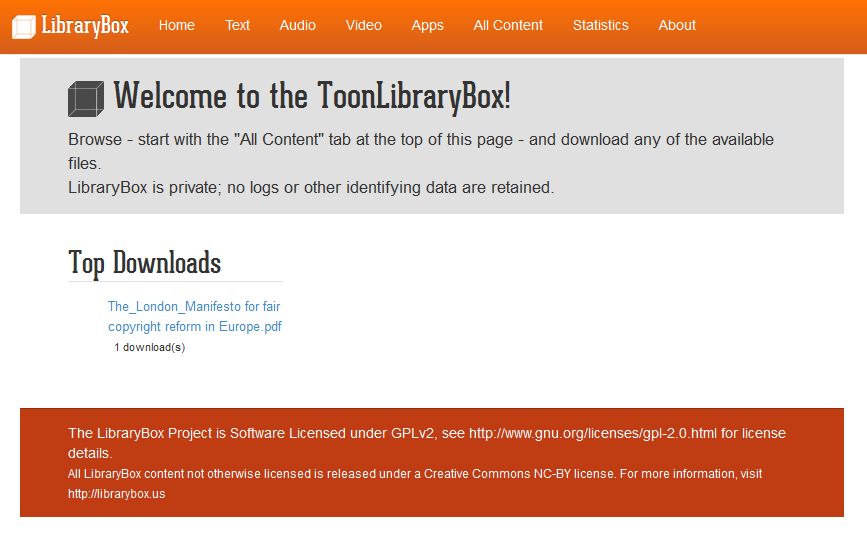
The ToonLibraryBox homepage


While I was waiting for my LibraryBox to be "allowed" at City Library, I took it home to continue tweaking it. Also I wanted to "play" with Putty and FileZilla - and as you can imagine, it was much easier to do this on my own laptop than asking to get these installed on a work one.

My trusted old laptop did surprise me a bit as it just didn't pick up the LibraryBox, though it does recognise other wifi networks. I had to go in Control Panel / Network and Internet / Network and Sharing Centre / Advanced Sharing Settings - and turn on the network discovery.


The Box goes ever on and on
So now the ToonLibraryBox is set up, what is left to do? Just a couple of "small" things...
  1. Find it a permanent home. There are some great examples of LibraryBoxen being "staged" to make them more visible / tangible in the library, attract customers' attention to it, indicate where the signal is best, etc. I'd like to do something like that. I have a display case, just nowhere to put it! (or, if I'm honest, nowhere I would like it to be) So at the moment, the ToonLibraryBox is hidden somewhere on level 3 of City Library (but it works).
  2. Promote it. It's been in "test phase" for several months - it's now high time to properly launch it and make its presence more widely known to customers (and, yes, staff).
  3. Curate it. Change / add to the content regularly, develop themes, get people (both staff and customers - maybe even artists and authors?) to contribute to it. I have already spoken to my Local Studies colleagues (they have some interesting digitised material) and to the Library's publishing house but I am hoping to get other teams on board too.


I'm also chuffed by the fact the ToonLibraryBox is listed on the "France map of LibraryBoxen" (thanks to the guys over at BiblioBox). I know, claiming on a map of France a LibraryBox located in England - wars were started over that sort of thing!!! But I'm also looking forward to hear from colleagues in the UK (and beyond) interested in LibraryBoxen - so, over to you!

Tuesday, 23 December 2014

French libraries and the digital world (2/2)

On 13th November I attended a day of workshops on libraries in the digital world organised by the local groups of the French library association ABF at the Marguerite Duras library in Paris. In the first post I talked about the format of the day and the first session I attended (LibraryBox); here are notes and thoughts from the other two sessions.

CC BY-NC-ND Julien (Source: Flickr)
Supporting library users in the digital world
This session was led by Christophe Avdjian and Christelle Moreau of the - under-construction - Françoise Sagan public library in Paris. It was the session I attended that day that had the most participation (maybe because the others were about things that are still so "new", few participants had experience to share?) and it was great to hear everyone chip in with slightly different practices.

The issues we discussed were:
  • What are the skills required to support our library users in the digital world? Most people had learned on the job.
  • Is this activity part of your job description? For some yes, for others not specifically.
  • Should it be every library staff's job or a dedicated team's? The answer seems to depend on the size of the library.
  • What type of workshops (themes) do you offer? Depends if staff know how to use a particular electronic tool/device, if the library buys it for its users... Sparked a discussion on when is it not the job of the librarian anymore, e.g. when it comes to CV writing workshops: it transpired that it is the librarian's job when there isn't any other support structure in the area.
  • What format? (in terms of length of session, group/individual) Some participants also do "on the go"/floor walking-type of support: they go around the library with a tablet to show the electronic resources to customers using the building.
  • Disclaimers: if we install something on the user's device we have a responsibility. It is good practice to specify to the user at the point of booking what they are going to get from the session, and also what they are not going to get.

FabLabs and libraries
I wrote FabLabs AND libraries - not to be confused with FabLabs IN libraries. If I say "FabLab", you will be picturing 3D printers, computers, maybe a soldering station and a laser cutter [and possibly bearded men, but you'd be slipping into a cliché there]. Yes, they are a space for makers to access machines and tools but the opportunity for people to meet in person, exchange on their individual projects and share skills is just as important.


But back to the session: it was led by Julien Devriendt of Choisy le Roi public library and based on the presentation above (tip for non-French speakers: you can start on slide 9 and persevere to the examples and resources).
You might not want to have a FabLab in your library (really) but you can still offer digital fabrication activities.
To have a 3D printer in your library, you would need space, money - possibly extractor fans, and a good health and safety assessment. It might be best to focus on other types of activities, ones that help your users discover and question these technologies, gain new skills... It would be easier to rely on a network of people who know about these things - for example local Makers - rather than expect the librarians to do it. Libraries are about sharing knowledge and are instrumental in creating an environment where people do precisely that.

Ideas for activities:
  • Introduction to coding / programming using free resources like Scratch or Game Salad. Some libraries organise "coding goûters" [the goûter in French is the typical after-school / end of afternoon sweet snack or snack time for children] for families to come and play. Each participant develops their own project, shows it off to the others and receives suggestions for improvement from everyone.
  • Robotics project: support a group of young people taking part in a robotics competition. What strategy to adopt for the robot, what design, how to document the process and share it with others (writing a blog including sketches and description)... Offers the possibility to link with other topics.
  • Stick to simple projects, for example using Makey Makey which apparently is quite easy to use to create interactive "stuff" in your library [I have seen a fruit piano done like this at Gateshead Libraries eDay - it was brilliant] You can find instructions on Make It @ Your Library or Instructables.
ABF has a special interest group devoted to FabLabs - their wiki [in French of course] is worth a visit.


So that's France - but what's happening in the UK? There was a great article in the November 2014 issue of CILIP Update featuring Fab Lab Devon at Exeter Library (the first FabLab within a UK public library), Gateshead Libraries (our neighbours from across the river!), the amazing Sue Lawson of Manchester Libraries talking about working with her local "MadLab", and the intriguing library-hackspace The Waiting Room in Colchester.

And more local to me: where in the country does the annual Maker Faire UK take place? In Newcastle upon Tyne. How far from my workplace did I have to travel to take the above picture of the Newcastle Makerspace? Oh, I just stood on the pavement outside the City Library. What are Newcastle Libraries doing in terms of engaging users with digital fabrication activities? Erm... So what are we waiting for?! ;-)
(Alright, personally I'm now waiting to see what's in the box sent by Common Libraries and looking forward to attending their event at ours in March!)

If you read French (or aren't afraid of automatic translators), the organisers of the workshops have been publishing summaries of each of the sessions on the blog of ABF Paris (all the articles with #ateliersnum in the title)

Sunday, 21 December 2014

French libraries and the digital world (1/2)

On 13th November I attended in Paris a day of workshops on libraries in the digital world organised by the local groups of the French library association ABF. The format of the day was inspired by the unconference principles but it was a lot more prepared than the Library Camps I have attended or helped improvise! Participants were asked for session themes about two months in advance; the programme of the day was settled by the end of September and the organisers appealed to some local librarians with knowledge of the topics to lead the sessions. I was told that since the workshops were taking place on a week day, library managers wanted to see the programme in advance to make sure it was worth them releasing their staff to attend.

Before I tell you about the sessions I attended, I would like to point out something that struck me: both in the UK and France, librarians look to the US - simply because there are so many things happening, so many new developments, ideas that are tested there first - but we tend not to look much to our neighbours on the other side of the Channel. Now, of course we can't compete with the number of interesting projects taking place in the US, but I get the impression that in the UK we don't talk about French libraries - unless a Shakespeare First Folio is discovered in one of them; and when French librarians talk about the UK it's mainly to the shocked at the situation of our public libraries.

"Parisian church..." CC BY-NC-SA JH Images.co.uk
Source: Flickr

LibraryBox
A LibraryBox is a "portable digital file distribution tool" (more information on the LibraryBox Project website) For a user, it works like this: you switch on the wifi on your laptop / phone / tablet and connect to the LibraryBox network. You open a browser window, choose files and download them. It's as easy as that! Users cannot upload files (only admins can) and it's up to the librarian to curate the contents. An obvious use may be to share works in the public domain or under Creative Commons (CC) licences.

The session was led by Thomas Fourmeux of Aulnay-sous-Bois public library. It covered where to source and how to set up a LibraryBox and included discussions on what to use it for and how to make sure customers actually use it too! Here are a few points:
  • It's not just about e-books: on a LibraryBox you can also share audio (e.g. music), video (films), etc. So it can exist either in parallel to a commercial e-book offer (especially when the platform used is not very flexible) or as the only access point for electronic resources a library service may have.
  • Be careful with the content offered on the LibraryBox: check the works are under a licence that allows this (I was interested to hear that Aulnay Libraries offer items under CC including some for Non-Commercial use, and educate users about what it means) but also that it suits your public (in a public space, children may be accessing the LibraryBox too!)
  • Make sure you offer works in different formats so that users can download them in the right format for their device.
  • The browser interface is coded in html so can be edited and expanded, for example by adding a search box or a wiki.
  • The signal of the LibraryBox is not super strong so it may not be accessible in all corners of the library (and even less when it's a big building).
  • Just like with other online resources, people need to know about it otherwise they won't use it. Consider staging the actual Box in the library e.g. as the centrepiece of a display to attract customers' attention. (It also helps resolve the issue mentioned in the point above as people will know where to go to find the strongest signal.)
  • Customers will also need to be educated on how to technically use the LibraryBox.
If you're curious to see what Aulnay Libraries offer on their LibraryBox, they also store the content on a Dropbox account accessible via their website (see the index of works by author) A session participant was going to use her LibraryBox to tie in with local cultural events, and in particular a music festival - asking artists if they would donate a song for people to download freely via the LibraryBox at the festival's location or in other public places.

The early adopters of the LibraryBox in France have created a network of support to share their expertise and spread the word - the website over at Bibliobox.net [in French, obviously] even includes a map of LibraryBoxes in France!

CC BY-SA Bibliobox.net (screen capture 21/12/14)

I have included a LibraryBox in my Carnegie Library Lab project so I am looking forward to ordering and setting it all up come January...

In the next blog post I will sum up the other two sessions I attended that day: on supporting customers in the digital world, and on fablabs & libraries.

Friday, 6 July 2012

ABF 2012, part 4/4: digital resources survey

From 7th to 9th June 2012, the ABF (Association des Bibliothécaires de France - the French library association) held its 58th annual congress in Montreuil, near Paris. And I was there! I had been invited by a friend on the ABF regional branch committee for the wider-Paris area to help out during the three days. This gave me the opportunity to attend several sessions, most of them directly linked to the conference theme: 

The last session I would like to share with you is a presentation by the company Vodeclic of their first ever annual digital resources survey.
Vodeclic is an e-learning firm, selling IT tutorials to different kind of organisations, from businesses to libraries. It has recently undertaken a survey of digital resources in French libraries, the results of which were published in February 2012. The survey was sent to the 1000 biggest public library services in France and got 235 responses. Note to non-French readers: in France, public libraries are under the authority of the town, an administrative entity that can be much smaller and therefore with less financial resources than the British counties and cities.
I thought it would be interesting to compare the results with a UK library I am familiar with; for this purpose, I was kindly allowed to use figures from Newcastle Libraries.

28% of the libraries responding to the survey declared they did not have any digital resources available to customers. However, half of these were planning on launching a digital offer in 2012.

Of the remaining library services, 75% declared having at least 3 digital resources - meaning, for the most part, online databases - and 58% had at least 5. Unfortunately, more detailed data was not available; the Vodeclic speakers did admit they needed to refine this part of the survey for next year's. In comparison, Newcastle Libraries offer at least 20 resources!
Most of the libraries surveyed had launched their digital offer more than two years ago, which is also the case for Newcastle. Unlike in Newcastle, however, 62% of French libraries said they did not reduce their budget for paper resources when moving to digital resources.
32% of libraries have a budget of less than 5,000€ (about £4,000) for digital resources and 52% of less than 10,000€. Only some of the bigger cities (22% of the respondents) have a budget reaching over 20,000€ (about £16,000); Newcastle is also in this group, with a budget about £70,000.

The most popular types of digital resources offered by French libraries are, in descending order: self-directed learning, press, encyclopedias. In Newcastle Libraries, resources are mainly encyclopedias and dictionaries or related to business and law.
In more than half of the French libraries resources are only available on-site, whereas Newcastle Libraries customers have access to 15 online resources anywhere at any time, via the 24 Hour Library.

Vodeclic also asked the libraries how the resources were promoted: 80% used their website as well as leaflets and posters. Only 40% declared that library staff had received training, and 20% had workshops for customers.
In Newcastle, the resources are also promoted using both paper materials and the library's website. There is training available for staff on some of the resources (classes, presentation of the resource in internal newsletter) and regular classes or one-to-one sessions for customers on family history and business resources.

In France, over 75% of libraries esteem that less than 10% of their customers use their online resources. This is similar to Newcastle, where the number of visits to digital resources and active borrower figures for the month of February 2012 show a usage of 9%.
The feedback received by the French libraries seemed satisfying, though 25% of them admitted not knowing what their customers thought. I had access to feedback collected by Newcastle Libraries from customers attending business resources workshops - most comments mentioned these being "interesting" and "useful". For other types of digital resources, unfortunately, the library tends to hear about them only when there is a problem.

In the conclusion to the results of their survey, Vodeclic pointed out two main issues: budget and training. Libraries and local authorities consider digital resources are too expensive for them to acquire and offer for use in a way that is convenient to users (i.e. with a sufficient number of simultaneous connections and off-site access). More training should be provided in order to increase awareness and usage of the resources: training for staff so that they can promote the resources and training for customers to help them get started.
In comparison to the French libraries surveyed, Newcastle Libraries seem to be doing very well! Though again, it should be mentioned there is a difference in size and therefore budget between library authorities in France and in the UK. It would be interesting to get more comments from Newcastle Libraries customers on several types of digital resources: which ones they use and what they think of them, which ones they don't use and why, which ones they would like the library to offer. More ways of raising awareness - and eventually, usage - of the resources could be developed: perhaps by offering more workshops on different subjects or being able to work more closely with schools regarding information literacy classes; all of which are I believe already being looked into.