Sunday, 8 May 2016

The SCL Learning Offer in the North East

Last Friday 6 May I had the opportunity to attend the Society of Chief Librarians' Universal Offers roadshow at Newcastle City Library.
My understanding is that the Universal Offers have been developed by the SCL to better promote what public libraries do but also help library services understand where they might be lacking or leading compared to others in England. When a public library signs up to an Offer they agree to provide a core package of services linked to a particular area. For example, the Digital Offer includes: "free internet access (for a minimum period of time), clear and accessible online information about library services, staff trained to help customers access digital information". The Offers are continously expanded and new ones are developed.

The regional roadshows allow librarians to come together to share best practice but also provide feedback on each Offer - for a snapshot of the North East event, check out the #neroadshow hashtag on Twitter. I spent my day at the Learning Offer table, as I had been asked to share my experience of releasing and re-using library data and how the Wuthering Hacks hackathon I organised last month encouraged members of the public to "develop and share ideas and learn together" in libraries, which is one of the points in the Learning Offer.

The Learning Offer also covers "that coding and making stuff"; as library staff felt they needed more information about how to run these types of activities, the SCL has produced a toolkit called Code Green to help them.
In Newcastle we have recently invested in some kit, so my colleague @biblioluke and I had set up some (Raspberry Pi, Arduino, etc.) in the room for roadshow attendees who'd never tried these to have a go. I am afraid the first thing I did with attendees arriving to the Learning Offer table in the morning is engage them in a bit of making! They created foil sculptures - which were fantastic and included a bird, a boat, a bracelet, a dog, a caterpillar (or similar type of creature) - to show off how a MakeyMakey works!


The reason for this post is simply that I took a few notes during the day, and instead of forgetting them I thought I might as well write them all up. Below is therefore a quick roundtable of some of the things I heard from colleagues in library services across the North East.

The Learning Offer in the North East: what other libraries are doing
  • Gateshead Libraries, like many others, offer a weekly job club: in 4 to 5 weeks unemployed customers learn how to write their CV using a computer, search for jobs online... Theirs is mainly attended by people over 50 years old. They may not get a job straightaway but they get a huge confidence boost.
  • In Middlesbrough the local history volunteers are realising how valuable their local knowledge is and therefore building their confidence too. They are now presenting to other groups and doing talks, one volunteer even teaching another how to use Powerpoint when they weren't particularly IT-savvy! 
  • In Northumberland the first Code Club is about to start at Hexham Library. When the library service was looking for volunteers, most of them seemed more interested in working with schools... In the end the Council's Digital Team helped get the Code Club set up, so the library is getting benefits from the activity with minimal input. 
  • In North Tyneside the Lifelong Learning arm of the Council deliver courses in libraries and are happy to take suggestions from library staff on further courses to offer.
  • Stockton Libraries took part in the BBC Get Creative Day on 2nd April and invited local creative people to showcase their work and run workshops for customers, including one on pottery and another on book art!

Thoughts on the Learning Offer
  • Local Studies and Family History are actually a big part of most services' learning offer (more than coding!)
  • The Learning Offer gives public libraries a chance to target other groups - those that maybe don't use libraries much / that we don't cater for very well e.g. teenagers, young adults in education.
  • More and more services are being pressured into generating income, but most of our customers can't afford to pay for things including learning activities.
  • Barriers to implementing the Learning Offer: space, time, money, staff. There are also less learning providers and they are offering courses in libraries with now-reduced hours.
  • Some Councils are putting pressure on libraries by asking: "OK, the library is doing this because it fits with its role, but what does it bring to the Council as a whole?"
  • Comment on the hackathon case study: if libraries ask Councils/IT anything to do with systems and data, the first answer they'll get is no.
  • Through SCL we could work more closely together. It's great to be able to meet people at the regional roadshow and know who to ask for advice on particular topics, though more formal peer mentoring or training is needed.
  • Next steps for the Learning Offer: more stuff for adults! Coding is not just for children [I couldn't agree more!]

Sunday, 7 February 2016

Coding: what schools do...

...that libraries could take inspiration from.


Last week I got sent on a training organised by the North-East group of ASCEL, the Association of Senior Children's and Education Librarians. Now, I'm clearly not a children's librarian (my association wouldn't be ASCEL but more something like: ACGIFL, the Association of Copyright Geeks and Intellectual Freedom Librarians! If it existed, of course.) My colleague who was supposed to go had an emergency and basically the head of the Children's team came to me and said: "Aude, it's training about coding, robotics etc. - you're into those things, would you go so the place isn't wasted?"

So there I am the next day, at the Open Zone CLC in South Shields. The Open Zone CLC team help school teachers across South Tyneside with IT. They provide support and training on the technical side of things but also deliver computing lessons for pupils as young as 4 years old and up to 18.
Interestingly, Open Zone also runs some workshops for parents, specifically on e-safety - however, they found there was a very low take-up, as the vast majority of parents don't realise how important safety and privacy online are!

Our trainer started by telling us about the new computing curriculum for Key Stage 1 & 2 (primary school, 5 to 11 year-olds), which encompasses computer science, information technology and digital literacy including e-safety. The day was then spent trialling some of the tools and devices Open Zone use to teach what the national curriculum prescribes.

Screenshot from "Daisy the dinosaur"
We started by trying out some coding apps for younger children:
 Daisy the dinosaur (free iPad app; can be used by 3-year-olds)
 Kodable (didn't try that one)
 Hopscotch (free iPad app; good but I got confused by the categories)
 Scratch junior (the little brother of the MIT platform; free app available for Android, iOS and even Kindle)

Before moving on to tools for an older age range we got to play with Bee Bots - though to be correct the ones we used were Blue Bots (connecting to a tablet via Bluetooth). These bees are programmable floor robots - and they're really fun.

Other recommended educational coding platforms for an older age range:
 Scratch (obviously!)
 Kodu (Microsoft programme that works with Xbox controllers and apparently "a bit more exciting than Scratch")
 Codecademy (free online courses for different programming languages)
 Hour of Code (yay!)

Blue Bot programmed on iPad and raring to go

I got called "swotty" several times during the day, and the first was when the trainer started talking about the Hour of Code. I totally agree when she said it is brilliant to get people started with coding and can be used for both children and adults. Where I disagree is when she recommended the Star Wars Hour of Code (in her defense, she did admit it was partly because she is a Star Wars fan!) whereas I think the Minecraft one's the best (because the squares make it easier to program how far the character needs to go. Plus Minecraft is way cooler than Star Wars - right?!  Erm, let's move on...)

Next on the agenda was Lego. Open Zone use Lego WeDo with primary school pupils and Mindstorms with secondary. We got to try the Mindstorms EV3. The programming interface still uses "blocks" of sorts but the options on the EV3 are definitely more advanced: first of all you have to figure out which motors to use (the robot has 3!) to make it move, and then there are all sorts of options and sensors to play with.
Note: if you checked out the Blue Bots and thought they were expensive, don't look at the Legos or your eyes will water.

Below is a very short video of an EV3 I programmed to: move forward, wait 3sec, turn around, move forward.  


After that (and some lunch), the trainer took us through a lesson plan she uses to teach pupils enough coding to create a game using Scratch (in a one and a half hour session). I'd played with Scratch before but not in-depth so that was my favourite part of the day!
Open Zone use the Scratch 1 offline editor (they have it installed on all the computers) rather than the web-based version.
Idea: in a library setting Scratch could be used to re-create scenes from books, for example.

Finally, we talked about the BBC Micro:bit which every Year 7 school kid is supposed to receive... at some point this year of the next, and had a look at Raspberry Pi. Open Zone had just received some Raspberry Pi kits they'd bought from their counterparts in North Tyneside. I had seen the Build IT kits demonstrated at the last Maker Faire UK but getting my hands on one I was less impressed. I guess it's handy for schools because it comes with a breadboard and the Pi mounted on a card (so less risk of losing one) plus some cables, LEDs, resistors... It also comes with a project booklet, but when 4 librarians have a look at the very first project and all conclude that it's not clear what one is supposed to do, I feel like my library didn't miss anything not getting those.

All in all it was an interesting day where I got to try out several tools - a bit like a "try before you buy"! And now it's time for a think with my colleagues to decide what we actually can and want to do in terms of offering coding activities for our customers young and old to learn in libraries.
 

Tuesday, 25 August 2015

The ToonLibraryBox : setting up

As mentioned in a previous blog post, as part of my Carnegie Library Lab project Commons are forever one of the ideas was to set up a LibraryBox at Newcastle City Library.  I thought I would share here my experience of doing just that - as a kind of "LibraryBox for the only-mildly-techy people" (like me) heads-up. So it's not an how-to guide but just some notes about stuff I encountered, which are going to make the "people in the know" smile while reassuring the others that they're not alone!

Newcastle Libraries present... the ToonLibraryBox

Set up a - what??
Oh, sorry - you've never heard of LibraryBox? It's a portable digital file distribution tool mainly composed of a router and a USB stick; to use it people just connect to the LibraryBox on a wifi-enabled device, open a browser window and can start downloading whatever documents are stored there. These documents are often either in the public domain or shared under an open license, and obviously carefully chosen by the librarian.
It may not have made it into the Oxford Dictionary yet, but the plural of LibraryBox is LibraryBoxen.
For more information on how it can be used, what you need to do to set up your own and how to customise it, there are two wonderful resources out there: the US LibraryBox Project original website and the French BiblioBox [in, well, French!]
CC BY-NC Jason Griffey (Source: LibraryBox)

What FAT32 really means (or how to nearly fail before even starting)
We are at the beginning of the story set-up. After reading thoroughly the instructions on both websites mentioned above (I am the kind of person who re-reads twice the recipe), I have ordered my MR3020 router and my USB stick. I know I need my USB formatted in FAT32 (whatever that is). I am spending a quiet evening in the library - I crack my knuckles, look up how to format in FAT32 when my work computer runs Windows, and start.
And I wait. And wait. And wait (well, to be honest I did other things in the meantime!) and it doesn't work.
I am the stubborn type. I try again. Error message again: "volume size too big". Erm, what? As it turns out, you can't format in FAT32 something that's bigger than 32GB. My USB (because I'm greedy ambitious) is a 64GB. Oops.

Thankfully, all I need to do is partition the thing to obtain 2 x 32GB to be formatted. But I cannot do that on my work computer because it's all locked and as a librarian I don't have that kind of permissions. Thankfully, I'm friends with the IT guy (more on that later) and he's kind enough to do it for me. Phew! First thing learnt.


Does your library have a predatory wifi network?
At this point, I have managed to set up my LibraryBox. I test it with my phone: it works! It's fantastic. I am so excited I want to show my friend the IT guy. I go over to his desk. Tell him what to do. It doesn't work anymore. *panic*

Sensing my dismay, my IT guy asks: "Oh, so this thing is its own wifi network, right? Have you had it white-listed?" "Erm, why?!", I ask.
Well, ladies and gentlemen, Newcastle City Library has a wifi network - for members of the public to access the Internet of course. But this network cancels out every other wifi network in the building. So when I connected to my LibraryBox, its wifi network had just been born and I managed to use it. But a few minutes after it was too late for my LibraryBox: the library's predatory wifi had noticed it and blocked it!
Needless to say, my friend from IT made the necessary calls to get the LibraryBox network unblocked.
Tip: be nice to your IT people - not only because it's a good thing to do, but also because you're probably going to need them anyway. (Honestly, if my favourite IT guy wasn't diabetic I'd have bought him chocolates)
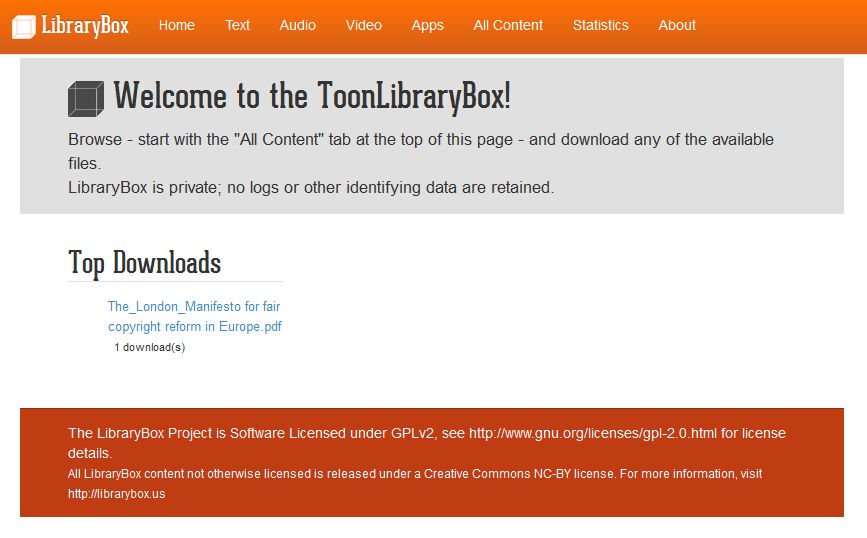
The ToonLibraryBox homepage


While I was waiting for my LibraryBox to be "allowed" at City Library, I took it home to continue tweaking it. Also I wanted to "play" with Putty and FileZilla - and as you can imagine, it was much easier to do this on my own laptop than asking to get these installed on a work one.

My trusted old laptop did surprise me a bit as it just didn't pick up the LibraryBox, though it does recognise other wifi networks. I had to go in Control Panel / Network and Internet / Network and Sharing Centre / Advanced Sharing Settings - and turn on the network discovery.


The Box goes ever on and on
So now the ToonLibraryBox is set up, what is left to do? Just a couple of "small" things...
  1. Find it a permanent home. There are some great examples of LibraryBoxen being "staged" to make them more visible / tangible in the library, attract customers' attention to it, indicate where the signal is best, etc. I'd like to do something like that. I have a display case, just nowhere to put it! (or, if I'm honest, nowhere I would like it to be) So at the moment, the ToonLibraryBox is hidden somewhere on level 3 of City Library (but it works).
  2. Promote it. It's been in "test phase" for several months - it's now high time to properly launch it and make its presence more widely known to customers (and, yes, staff).
  3. Curate it. Change / add to the content regularly, develop themes, get people (both staff and customers - maybe even artists and authors?) to contribute to it. I have already spoken to my Local Studies colleagues (they have some interesting digitised material) and to the Library's publishing house but I am hoping to get other teams on board too.


I'm also chuffed by the fact the ToonLibraryBox is listed on the "France map of LibraryBoxen" (thanks to the guys over at BiblioBox). I know, claiming on a map of France a LibraryBox located in England - wars were started over that sort of thing!!! But I'm also looking forward to hear from colleagues in the UK (and beyond) interested in LibraryBoxen - so, over to you!

Monday, 25 May 2015

Fab Futures : non-library-FabLab founders

At the Fab Futures conference at Exeter Library there were talks about the FabLabs in Devon and Chattanooga libraries but there were also speakers involved in FabLabs that aren't in libraries.

Inside Exeter Library

Richard Clifford, MAKLab (Glasgow)
Interestingly, Richard's background is in architecture and design: he even taught architecture at the Glasgow School of Art! When establishing MAKLab, the founders were primarily interested in bridging a gap in education (getting people "job-ready"), but also wanted to look at social and economic issues by engaging groups such as disenfranchised young people and unlocking their potential.
In his talk "The power of collaboration", Richard drew from his experience at MAKLab to make us think and ask ourselves the right questions about why and how we would want a FabLab in our libraries.

Sharing experience: the team in Glasgow (currently 8 people) all started as volunteers and are now in full-time employment. They bring a diverse set of skills with them. As Richard said: "You can buy as much equipment as you want but in FabLabs the real value is the knowledge base, what the people know".
Think: what experience or skills in your team are underused? Who goes home at night and does something different?
What skills are missing from your team?
Space is expensive: so is electricity, a cleaner... MAKLab has a co-working space so everyone shares the costs and helps out.
Do you have spaces that are under- or unused? There is a lot of pressure on libraries to maximise space but are the spaces in your library being maximised for the right goal?
Who could use those spaces?
Sharing resources is important, as the equipment and technology change quickly; equipment is expensive and so is the knowledge on how to use it. You need to understand what equipment/machines you truly need.
What do you need?
Who has it? Is it being used where it is?
FabLab Exeter

There are other organisations out there that need the same things and have the same aims as you. MAKLab got together with four other local social enterprises to form The Wood Cooperative.
What benefit would you have in collaborating with a particular organisation? How does it make you stronger?
MAKLab is working with the NHS to prototype medical products such as 3D-printed teeth. FabLabs are where the real innovation is happening, because they are more nimble than the big organisations - therefore you should value your contribution!
What sets you apart? What are the reasons people come to you?
FabLabs - like libraries! - are about social empowerment e.g. empowering unskilled people to build something themselves, together. MAKLab helped a community design and build a boathouse - the people involved leave with new knowledge and confidence in themselves.
Another initiative (which I'd first heard of thanks to Marc De'ath of St Botolph's The Waiting Room) which has spread across the UK is Men in Sheds where older men come together in a workshop for some woodworking or other similar activity, but also for socialising. What is interesting is also to use it for intergenerational dialogue and transfer of skills by inviting school children in as well.
What groups do you want to work with?
What did you talk about on day 1, are still talking about and why have you not done it yet - what's the barrier?
Innovate quicker and don't be afraid of high risk: Richard said there is a culture shift in funders which means it is now ok to fail (though I'm not sure it has reached Councils yet?) Start small and prove your point: get some seed funding or borrow a piece of equipment from someone for a week and do something with it.
At this point, Richard also mentioned that highly innovative products do break down a lot!

Compliance and de-risk: you need to learn and design through the risk. Risk is always present, there are just ways of mitigating it e.g. programme a machine to stop as soon as you touch it.

Libraries are in the best position to develop FabLabs and maker spaces because we are already talking to the groups that need these things most (job seekers, young people...)
 
3D printers and laser-cutter at Exeter Library FabLab

Phillippa Rose and Joss Langford, MakeSouthWest
MakeSouthWest is a network of community-led maker spaces, educational establishments and industry partners in the South-West of England. Its members include a library (FabLab Exeter), a secondary school (KEVICC in Totnes), the Plymouth College of Art...
One of the initiatives mentioned is Open Devon: an open week for the local engineering and manufacturing sites (as far as safety and intellectual property protection allow!) It is an opportunity for the participating businesses to showcase their work and potentially find people who may be interested in working with them (either individuals - as future employees - or other businesses).

Eddie Kirkby, FabLab Manchester
The FabLab Manchester opened in 2010 and was the first of its kind in the UK. The FabLab is about empowerment: enabling members of the public to design and make their own things, but also inspiring them. It offers access to equipment and educational workshops as well as - to fund its free open days - a range of commercial services e.g. prototyping. It is very much about telling people and businesses: what do you want made? and we'll teach you how to make it.
In its first 4 years, the FabLab has seen about 2,500 visitors a year (numbers for both visitors and members keep growing), helped bring 20 new products to market and has even seen its first millionaire!
"Libraries are about access to knowledge. First they had books because that's where the knowledge was. Then they got computers because that's where the knowledge moved to. Now it's digital making." Eddie Kirkby